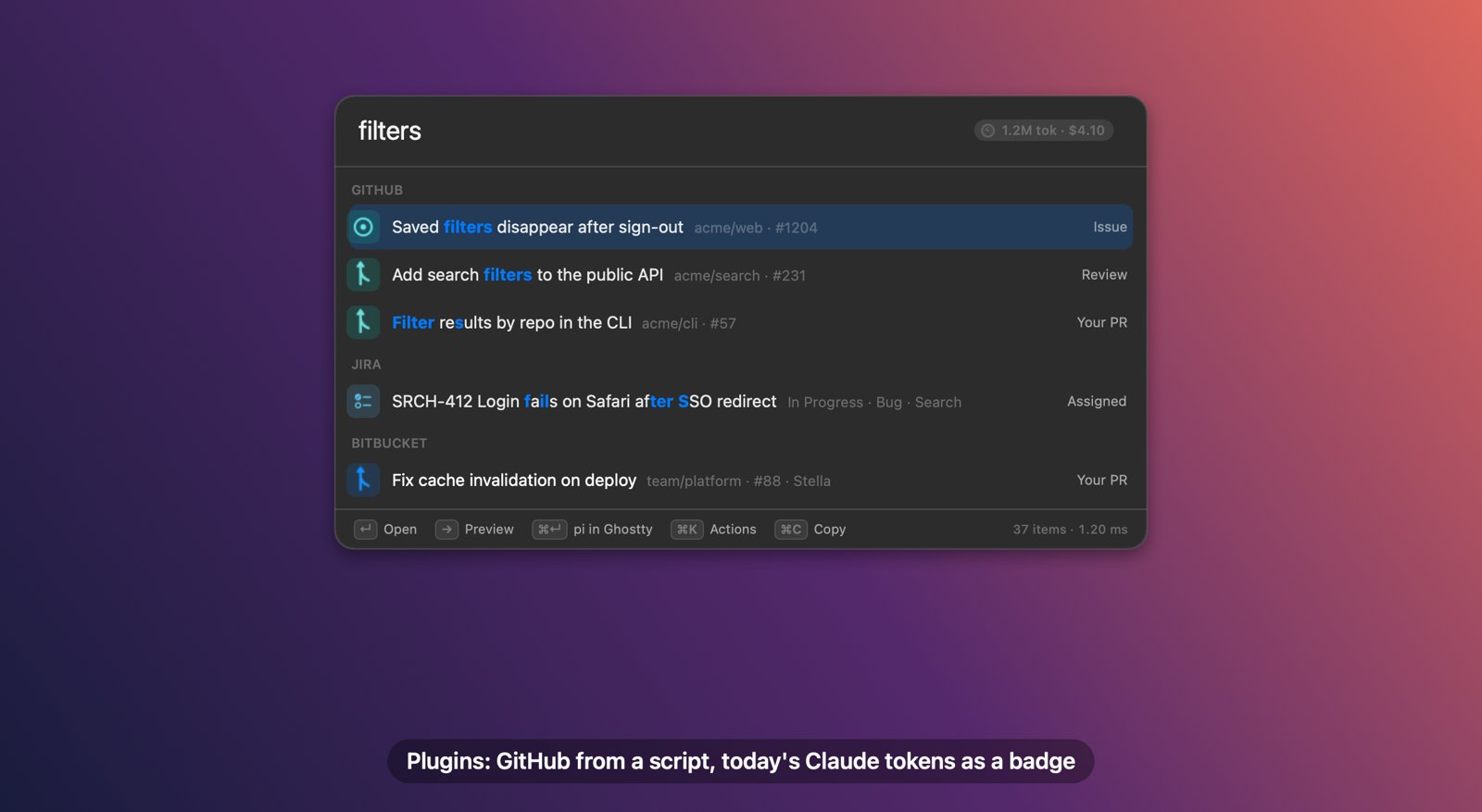
The real panel: GitHub rows come from the github plugin's script; the 1.2M tok · $4.10 pill is the tokens badge.
Build one with your agent
Euclid keeps the whole plugin format in ~/.config/euclid/plugins/AGENTS.md, written for
coding agents. Your agent reads it, writes the folder, runs --try-plugin until it prints OK, and the
plugin shows up in the bar the moment it's saved.
your agent
1. Describe what you want
2. Copy the prompt into Claude Code, Codex or any agent with a shell
The prompt points at the plugin guide, the whole format on one page.
Euclid also keeps a copy at ~/.config/euclid/plugins/AGENTS.md.
Agent without web access? and paste it in first.
1
Ask
Paste a prompt into Claude Code, Codex or any agent with a shell.
2
It tests itself
--try-plugin prints the exact rows or error, so the agent fixes its own mistakes.
3
It's live
Euclid watches the plugins folder and reloads on save. You don't restart anything.
Worked example: a token badge
Paste this, and a minute later the bar shows 1.2M tok · $4.10. Click it and
ccusage opens in a new Ghostty tab.
Read ~/.config/euclid/plugins/AGENTS.md. Then make a Euclid plugin in
~/.config/euclid/plugins/tokens that shows today's Claude Code token use and
cost as a badge on the bar, using `npx -y ccusage@latest daily --json`.
Clicking the badge should open `ccusage daily` in a new Ghostty tab
(ghostty-run tab ...). Refresh every 5 minutes.
Run `/Applications/Euclid.app/Contents/MacOS/euclid-bar --try-plugin tokens`
and fix the plugin until it prints OK.
Read ~/.config/euclid/plugins/AGENTS.md and make a Euclid
plugin "vercel" that lists my 20 most recent Vercel deployments
(vercel ls --json) with project, state and age, opening each URL.
Test it with euclid-bar --try-plugin vercel until it prints OK.
Time zones
Answer
Type tz 3pm and see that time in your team's cities.
Read ~/.config/euclid/plugins/AGENTS.md and make a Euclid
plugin "tz" with an [answer] on prefix "tz": `tz 3pm` shows 3pm
local time in Sydney, London and San Francisco, one row each,
↵ copies the row. Use only date(1). Test with
euclid-bar --try-plugin tz "tz 3pm" until it prints OK.
On-call status
Badge
Who's on call, right on the bar.
Read ~/.config/euclid/plugins/AGENTS.md and make a Euclid
plugin "oncall" with a badge showing who is on call now from
PagerDuty (token from the Keychain, service euclid-pagerduty),
refreshed every 15 minutes; clicking opens the schedule.
Test with euclid-bar --try-plugin oncall until it prints OK.
Runbooks
Source
Every runbook in your team repo, searchable.
Read ~/.config/euclid/plugins/AGENTS.md and make a Euclid
plugin "runbooks" that lists the markdown files in
~/work/ops/runbooks by their first heading, opens them in my
editor, and shows the first 40 lines in the preview.
Test with euclid-bar --try-plugin runbooks until it prints OK.
Directory
Euclid stays small: features only some people need ship as plugins, so you add the ones
you use with one command. Each is a few lines of script you can read in
~/.config/euclid/plugins/<name>/, then change however you like.
GitHub
Source
Your open PRs, PRs waiting on your review, and issues assigned to you. Uses the gh CLI, so there's no token to manage.
Type fix login → your PR “Fix login on Safari” with a Review label.
euclid-bar --plugin add github
How it's written · 26 lines
Every 5 minutes items.sh asks the gh CLI for your PRs and issues and prints one JSON row each.
plugin.toml
name = "GitHub"
description = "Your open PRs, PRs waiting on your review, and issues assigned to you. Uses the GitHub CLI: brew install gh && gh auth login"

[source]
run = "./items.sh"
refresh_minutes = 5

[[action]]
name = "Search GitHub code"
run  = 'open "https://github.com/search?type=code&q=$EUCLID_QUERY_URL"'

[settings]
limit = 30          # per list; override in config.toml with [plugin.github] limit = 50
Linear issues assigned to you and not done. ↵ opens one, ⌘C copies its ID. The API key lives in the Keychain.
Type eng- → your open Linear issues, newest first.
euclid-bar --plugin add linear
How it's written · 24 lines
Every 5 minutes items.sh sends one GraphQL query with your key from the Keychain and prints a row per issue.
plugin.toml
name = "Linear"
description = "Linear issues assigned to you. Store a personal API key (Linear › Settings › Security & access) in the Keychain: security add-generic-password -s euclid-linear -a \"$USER\" -w '<key>'"

[source]
run = "./items.sh"
refresh_minutes = 5

[settings]
token_command = "security find-generic-password -s euclid-linear -w"
limit = 50
items.sh
#!/bin/sh
# Linear issues assigned to you and not done. ↵ opens the issue, ⌘C copies its ID (ENG-123).
set -eu
command -v jq >/dev/null 2>&1 || { echo "needs jq: brew install jq" >&2; exit 1; }
key=$(eval "$EUCLID_SETTING_TOKEN_COMMAND" 2>/dev/null) || key=""
[ -n "$key" ] || { echo "no Linear API key: security add-generic-password -s euclid-linear -a \"$USER\" -w '<key>'" >&2; exit 1; }
query='query($n: Int) { viewer { assignedIssues(first: $n, orderBy: updatedAt,
  filter: { state: { type: { nin: ["completed", "canceled"] } } }) {
  nodes { identifier title url state { name } team { key } } } } }'
jq -n --arg q "$query" --argjson n "${EUCLID_SETTING_LIMIT:-50}" '{query: $q, variables: {n: $n}}' |
  curl -fsS https://api.linear.app/graphql -H "Authorization: $key" -H 'Content-Type: application/json' --data @- |
  jq -c 'if .errors then error(.errors[0].message) else .data.viewer.assignedIssues.nodes[] end
         | {title, subtitle: "\(.identifier) · \(.state.name)", open: .url, id: .url, copy: .identifier,
            label: .team.key, icon: "checklist"}'
Slack
Source + answer
Jump to any channel you're in, and type slack deploy failed to search messages. Needs a user token.
Type slack deploy failed → the 10 best matching messages.
euclid-bar --plugin add slack
How it's written · 35 lines
A source lists your channels every hour; an answer runs search.sh only when you type the slack prefix.
plugin.toml
name = "Slack"
description = "Jump to your Slack channels, and search messages with `slack <words>`. Needs a user token (xoxp-) with channels:read, groups:read and search:read, in the Keychain: security add-generic-password -s euclid-slack -a \"$USER\" -w '<token>'"

[source]
run = "./channels.sh"
refresh_minutes = 60

[answer]
run    = "./search.sh"
prefix = "slack"

[settings]
token_command = "security find-generic-password -s euclid-slack -w"
channels.sh
#!/bin/sh
# Channels you're in; ↵ opens them in the Slack app.
set -eu
command -v jq >/dev/null 2>&1 || { echo "needs jq: brew install jq" >&2; exit 1; }
token=$(eval "$EUCLID_SETTING_TOKEN_COMMAND" 2>/dev/null) || token=""
[ -n "$token" ] || { echo "no Slack token: security add-generic-password -s euclid-slack -a \"$USER\" -w '<xoxp-token>'" >&2; exit 1; }
api() { curl -fsS -H "Authorization: Bearer $token" "https://slack.com/api/$1"; }
team=$(api auth.test | jq -r 'if .ok then .team_id else error(.error) end')
api "users.conversations?types=public_channel,private_channel&exclude_archived=true&limit=1000" |
  jq -c --arg team "$team" 'if .ok then .channels[] else error(.error) end
         | {title: "#\(.name)", subtitle: (.purpose.value // ""), open: "slack://channel?team=\($team)&id=\(.id)",
            id: .id, icon: (if .is_private then "lock" else "number" end)}'
Today's Claude Code tokens and cost on the search bar, from ccusage. Click it for the full report in a terminal.
Always on the bar: 1.2M tok · $4.10. Click it for the full report.
euclid-bar --plugin add tokens
How it's written · 18 lines
A badge: every 5 minutes today.sh runs ccusage, which reads Claude Code's local logs, and prints one line.
plugin.toml
name = "Claude tokens"
description = "Today's Claude Code token use and cost on the bar, from ccusage. Click it for the full report."

[badge]
run   = "./today.sh"
icon  = "gauge.with.dots.needle.33percent"
refresh_minutes = 5
click = 'ghostty-run tab npx -y ccusage@latest daily'
today.sh
#!/bin/sh
# Prints today's Claude Code usage for the badge, e.g. "1.2M tok · $4.10". Needs Node (npx) and jq.
set -eu
command -v jq >/dev/null 2>&1 || { echo "needs jq: brew install jq" >&2; exit 1; }
if command -v ccusage >/dev/null 2>&1; then set -- ccusage; else set -- npx -y ccusage@latest; fi
"$@" daily --since "$(date +%Y%m%d)" --json |
  jq -r '[.totals.totalTokens // 0, .totals.totalCost // 0] | @tsv' |
  awk -F '\t' '{ t = $1 + 0
                 s = t >= 1e6 ? sprintf("%.1fM", t / 1e6) : t >= 1e3 ? sprintf("%.0fk", t / 1e3) : t
                 printf "%s tok · $%.2f\n", s, $2 }'
Contacts
Source
People by name, company, email or phone. ↵ opens the card, ⌘C copies the email. macOS asks once for access.
Type ada → Ada Lovelace · Analytical Engines · ada@example.com.
euclid-bar --plugin add contacts
How it's written · 21 lines
A JavaScript for Automation script reads the Contacts app once an hour and prints a row per person.
plugin.toml
name = "Contacts"
description = "People in Contacts by name, company, email or phone. ↵ opens the card, ⌘C copies the email. macOS asks once for access."

[source]
run = "osascript -l JavaScript ./people.js"
refresh_minutes = 60
people.js
// Everyone in Contacts, one JSON line each. Reads whole columns at once, which is fast.
function run() {
  const people = Application('Contacts').people
  const ids = people.id(), names = people.name(), orgs = people.organization()
  const emails = people.emails.value(), phones = people.phones.value()
  return ids.map((id, i) => {
    const name = names[i] || orgs[i]
    if (!name) return null
    const email = (emails[i] || [])[0], phone = (phones[i] || [])[0]
    return JSON.stringify({
      title: name, subtitle: [orgs[i] !== name ? orgs[i] : null, email, phone].filter(Boolean).join(' · '),
      open: 'addressbook://' + id, copy: email || phone || name, id, icon: 'person.crop.circle',
    })
  }).filter(Boolean).join('\n')
}
Shortcuts
Source + action
Every shortcut from the Shortcuts app, by name. ↵ runs it through the shortcuts CLI.
Type water → your “Log water” shortcut; ↵ runs it.
euclid-bar --plugin add shortcuts
How it's written · 16 lines
list.sh prints one row per shortcut from shortcuts list, with a run command on each.
plugin.toml
name = "Shortcuts"
description = "Your Shortcuts by name. ↵ runs one."

[source]
run = "./list.sh"
refresh_minutes = 30

[[action]]
name = "Open in Shortcuts"
run  = 'open "shortcuts://open-shortcut?name=$EUCLID_QUERY_URL"'
list.sh
#!/bin/sh
# One row per shortcut; ↵ runs it with the shortcuts CLI.
set -eu
command -v jq >/dev/null 2>&1 || { echo "needs jq: brew install jq" >&2; exit 1; }
shortcuts list | jq -Rc 'select(length > 0)
  | {title: ., subtitle: "Shortcut", run: "shortcuts run \(@sh)", id: ., icon: "square.2.layers.3d"}'
Dictionary
Answer
Type define serendipity for the macOS Dictionary's definition. ↵ opens Dictionary, ⌘C copies it.
Type define serendipity → the definition, right in the bar.
euclid-bar --plugin add define
How it's written · 20 lines
An answer on the define prefix calls macOS Dictionary Services and prints one row.
plugin.toml
name = "Dictionary"
description = "`define serendipity`: the macOS Dictionary's definition. ↵ opens it in Dictionary, ⌘C copies it."

[answer]
run    = 'osascript -l JavaScript ./define.js "$1"'
prefix = "define"
define.js
// The definition from the dictionaries you turned on in Dictionary.app, via Dictionary Services.
ObjC.import('CoreServices')

function run(argv) {
  const word = argv.join(' ')
  const open = 'dict://' + encodeURIComponent(word)
  const ref = $.DCSCopyTextDefinition(null, $(word), $.NSMakeRange(0, word.length))
  const text = ref ? ObjC.unwrap(ObjC.castRefToObject(ref)) : ''
  if (!text) return JSON.stringify({ title: 'No definition for “' + word + '”', subtitle: 'Open Dictionary', open, icon: 'character.book.closed' })
  return JSON.stringify({
    title: text.replace(/\s+/g, ' ').slice(0, 140), subtitle: word + ' · Dictionary',
    open, copy: text, preview: text, id: open, icon: 'character.book.closed',
  })
}
Currency
Answer
Type 100 usd to eur. Daily rates from a free API, no key, cached for an hour. ↵ copies the amount.
Type 100 usd to eur → the amount in euros at today's rate; ↵ copies it.
euclid-bar --plugin add currency
How it's written · 26 lines
An answer with a regex match: convert.sh fetches free daily rates, caches them for an hour, and prints the result.
plugin.toml
name = "Currency"
description = "`100 usd to eur`: converts with daily rates from open.er-api.com (free, no key). ↵ copies the amount."

[answer]
run    = "./convert.sh"
match  = '(?i)^\d[\d,.]*\s*[a-z]{3}\s+(to|in)\s+[a-z]{3}$'
prefix = "cur"      # or `cur 100 usd eur`
convert.sh
#!/bin/sh
# Rates are cached for an hour outside this folder (writing here would reload the plugin).
set -euf
command -v jq >/dev/null 2>&1 || { echo "needs jq: brew install jq" >&2; exit 1; }
# "100usd TO eur" → 100 USD EUR
set -- $(printf '%s' "$1" | tr 'a-z' 'A-Z' | sed -E 's/,//g; s/([0-9])([A-Z])/\1 \2/; s/ (TO|IN) / /')
[ $# -eq 3 ] || { echo "try: 100 usd to eur" >&2; exit 1; }
amount=$1 from=$2 to=$3
cache="${TMPDIR:-/tmp}/euclid-rates-$from.json"
if [ ! -s "$cache" ] || [ -n "$(find "$cache" -mmin +60)" ]; then
  # Not a currency (e.g. `10 kgs in lbs`): show nothing.
  curl -fsS --max-time 1.5 "https://open.er-api.com/v6/latest/$from" > "$cache.tmp" 2>/dev/null || { rm -f "$cache.tmp"; exit 0; }
  mv "$cache.tmp" "$cache"
fi
jq -c --arg to "$to" --arg from "$from" --arg n "$amount" '
  select(.result == "success" and .rates[$to] != null)
  | ($n | tonumber) as $a | .rates[$to] as $r | ($a * $r * 100 | round / 100 | tostring) as $v
  | {title: "\($v) \($to)", subtitle: "\($n) \($from) · 1 \($from) = \($r) \($to) · \(.time_last_update_utc)",
     copy: $v, icon: "dollarsign.arrow.circlepath", label: "Currency"}' "$cache"
euclid-bar is /Applications/Euclid.app/Contents/MacOS/euclid-bar. To type it
short, run alias euclid-bar=/Applications/Euclid.app/Contents/MacOS/euclid-bar.
Any git repository with a plugin.toml at its top level installs the same way:
euclid-bar --plugin add https://github.com/you/euclid-plugin-deploys.
How plugins work
Everything is optional, but a plugin needs at least one part. The full reference is
AGENTS.md in your plugins folder.
Part
What it adds
When it runs
[source]
Items in search: PRs, deploys, runbooks
In the background, every refresh_minutes (30 s limit)
[answer]
A reply to what you type, below the instant results
Only on its prefix or match regex (2 s limit)
[badge]
A short status chip on the search bar; click runs a command
In the background, every refresh_minutes
[[action]]
Actions in ⌘K, after your own
When you pick one
[settings]
Defaults you override in config.toml with [plugin.<id>]
Passed as $EUCLID_SETTING_<KEY>
A script prints rows
One JSON object per line. Only title is required. ↵ does the first of
open, paste, copy or run that's set. Add "suggest":true
to show a row when the box is empty.
Any language. Scripts run in your login shell inside the plugin folder, so Homebrew tools are on your PATH.
Safe with your input. What you type only reaches a script as $1 and $EUCLID_QUERY. It's never pasted into a command.
Never slows typing. Plugin results land below the instant ones, and a slow script is stopped at its time limit.
Secrets stay out of files. Read tokens from the Keychain in the script (security find-generic-password), the same way Bitbucket and Jira already work.
Share one
A plugin is a folder, so a git repo is all it takes to share one. Anyone installs it with
--plugin add <git URL>, and Euclid prints the commands it runs so they can read them first.
A team can keep its plugins in a shared repo and point everyone's config at it. Pulling
the repo reloads them.
Built something useful? and it may land in the directory.
# ~/.config/euclid/config.toml[plugins]
paths = ["~/work/team/euclid-plugins"]
disabled = ["tokens"]
[plugin.github]# your values for its settings
limit = 50
Plugins run as you, like your actions do, so read a plugin before you add it.
Copy an action below.
Paste it at the end of ~/.config/euclid/config.toml and save. Euclid picks it up straight away.
Use it: type something and run it any of the ways below.
Four ways to run an action
⌘KAction list. Type your words, press ⌘K, pick one with the arrows or its number. Works for every action.
⌘↵⌘1–⌘9By position. Actions keep the order they have in your config: the first one is ⌘1 and ⌘↵, the second ⌘2, and so on. Put your favourite first.
No match? They're already there. When nothing matches what you typed (usually a question), your actions fill the list, so ↵ runs the first one. That's why the AI agent actions don't need an alias.
aliasA word that runs it directly. Add alias = "gh" and typing gh swift testing + ↵ runs that action on “swift testing”, skipping the list. Worth it for lookups you do every day; cards with one show an alias tag.
Want one from anywhere, without opening Euclid? Give it a hotkey = "ctrl+opt+g" too; it runs with an empty query.
What you typed reaches the command as $1, or URL-encoded as $EUCLID_QUERY_URL. It's passed as an argument, so it can't run anything by itself.
Made a good one?
Ask Claude in a new Ghostty tab
AI agents
Type a question, ⌘↵, and Claude Code opens in a fresh tab with it.
[[action]]
name = "Ask Claude in a new Ghostty tab"
run = 'ghostty-run tab claude "$1"'
Codex in a herdr split
AI agents
Keep your current pane; Codex answers next to it.
[[action]]
name = "Codex in a herdr split"
run = 'herdr-run split codex "$1"'
Ask pi in a new Ghostty window
AI agents
A separate window for longer sessions.
[[action]]
name = "Ask pi in a new window"
run = 'ghostty-run window pi "$1"'
Search GitHub code
Codealias: gh
Type gh, a space, and what you are looking for.
[[action]]
name = "Search GitHub code"
alias = "gh"
run = 'open "https://github.com/search?type=code&q=$EUCLID_QUERY_URL"'
Open a GitHub repo
Code
Type owner/repo and land on it.
[[action]]
name = "Open repo"
run = 'open "https://github.com/$1"'
Open a project in VS Code
Code
Any path or repo name under ~/code.
[[action]]
name = "Open in VS Code"
run = 'code "$HOME/code/$1"'
npm package
Packagesalias: npm
Jump straight to a package page.
[[action]]
name = "npm package"
alias = "npm"
run = 'open "https://www.npmjs.com/package/$1"'
Rust crate
Packagesalias: rs
docs.rs for any crate.
[[action]]
name = "Rust crate docs"
alias = "rs"
run = 'open "https://docs.rs/$1"'
Go package
Packagesalias: go
pkg.go.dev search.
[[action]]
name = "Go package"
alias = "go"
run = 'open "https://pkg.go.dev/search?q=$EUCLID_QUERY_URL"'
Open a Jira issue
Atlassianalias: jira
Type jira ABC-123. Set your site once in [env].
[env]
JIRA = "https://your-site.atlassian.net"
[[action]]
name = "Open Jira issue"
alias = "jira"
run = 'open "$JIRA/browse/$1"'
Search Confluence
Atlassianalias: wiki
Find the page you half remember. Uses JIRA from the recipe above.
[[action]]
name = "Search Confluence"
alias = "wiki"
run = 'open "$JIRA/wiki/search?text=$EUCLID_QUERY_URL"'
man page in Ghostty
Terminalalias: man
Read the manual in a new tab.
[[action]]
name = "man page"
alias = "man"
run = 'ghostty-run tab man "$1"'
tldr in Ghostty
Terminalalias: tl
The short version of a man page (needs tldr installed).
[[action]]
name = "tldr"
alias = "tl"
run = 'ghostty-run tab tldr "$1"'
Free a port
Terminalalias: port
Type port 3000 to kill whatever is listening on it.
[[action]]
name = "Kill process on port"
alias = "port"
run = 'lsof -ti tcp:"$1" | xargs kill'
Pretty-print JSON to clipboard
Utilities
Paste minified JSON, get it formatted (needs jq).
[[action]]
name = "Pretty JSON to clipboard"
run = 'printf %s "$1" | jq . | pbcopy'
Random password to clipboard
Utilitiesalias: pw
24 random bytes, base64, no newline.
[[action]]
name = "New password"
alias = "pw"
run = 'openssl rand -base64 24 | tr -d "\n" | pbcopy'
Explain a shell command
Utilitiesalias: explain
explainshell breaks a command into its parts.
[[action]]
name = "Explain shell command"
alias = "explain"
run = 'open "https://explainshell.com/explain?cmd=$EUCLID_QUERY_URL"'
Search MDN
Docsalias: mdn
Web platform docs.
[[action]]
name = "MDN"
alias = "mdn"
run = 'open "https://developer.mozilla.org/en-US/search?q=$EUCLID_QUERY_URL"'
Made something worth sharing?
Send in an action or a plugin. We try each one and add the good ones here, with your name if you like.